Monday, March 14, 2011

Graphicleftovers Review

Royalty-Free Vectors and Images

I have become a contributor for Graphicleftovers for 3 months now. Uploaded 155 vectors there, and I have made 6 sales with a total $18.72. You can set your own pricing for your items. Graphicleftovers pays you 52% of the sales made. This is a very good deal. Furthermore, the uploading process is one the easiest.

There are many great comments about Graphicleftovers if you search over the Internet. But to be honest, I think this site needs some improvements. I wonder why the team in Graphicleftovers has never thought of doing something simple to improve the overall sales performance of the site.

I got a huge number of views (over 1000) in the first 10 days when I uploaded my vectors to Graphicleftovers. Then, in the next 3 months, I only have about a thousand views. There is no longer sales in my vectors and there are reasons why this happened.

Graphicleftovers does not have a good search engine. Period. I do not know for sure how the default search works, but basically, you can only filter your search by

Vectors/Images
GL Collection/GL Personalities
Vector Price ($1 - $20)

Where is the search for:

Relevency
Newest
Most Popular
Most View
Most Download

These are some very basic features a search engine must have, and Graphicleftovers only program some useless database query. This is the very reason why your images hardly get exposures even if they are good. Of course, they do have this GL Collection where your vector is handpicked by the inspectors, but who are them to judge whether a vector is good or bad? Beauty is in the eyes of the buyers. A good vector means more downloads/view/popular and those are the necessary key elements of how to sort your search results.

More annoyingly, the search result page only returns you with 20 results per page. This is undoubtedly difficult to navigate the search results. Graphicleftovers should show at least 100 results per page. Apart from that, they should show the search results in full screen, and not in a stingy 960 pixel width division. We are in the modern era where most of the people already have a big screen. Take a look at all those successful sites like Shutterstock, IStockPhoto, Dreamstime, and Fotolia. They all have full screen in their search result page. This is not rocket scientist, and every web designers can design a liquid layout.


Stingy 960px width and only 20 search results per page.

All and all, I am pretty upset with Graphicleftovers as they do not even have the two most fundamentals feature in their site. I must say that although Crestock sales is as bad, but at least they have push the site features to a very high standard one.

I hope Graphicleftovers read my blog, and they can pay attention to the two features I mentioned above - Search Filters + A Liquid Web Design.

Monday, February 28, 2011

GraphicRiver Rejection is Too High (for me)

I have been demoralized by GraphicRiver rejections due to their new standard of quality. I am doing not bad there, ranking 67 for total sales among all other artists, and I have only been there for a little over 6 months. Of course, the quality of my works are not top notch, but my portfolios are basically useful in the eyes of buyers - at least I think so. Buyers will buy stuffs that are more simple, useful and easy to work with. I have seen beautiful complex artworks that generate much lesser sales than expected.

Enough of the rant, and let me show you why I have finally given up on submitting new vectors to GraphicRiver. Below are some of the rejections I have gotten from GraphicRiver due to low quality.


I have to admit that it has been annoying to keep getting rejections after rejections, and sometimes I felt that they dislike me for personal reasons - yes, this is of course not the truth since a lot other designers has been getting rejection too, but it still hurt bad that you know you can earn so much more if they would have accepted those.

What GraphicRiver has been accepting recently are mostly cartoon characters, which we all know that are tough to produce and hardly any sales. Let me show you some example below from GraphicRiver.

http://s3.envato.com/files/1542754/1.jpg
Amazing artwork. Super, I must say.
2 sales in first 18 days.

http://s3.envato.com/files/1528359/retroframes-preview.jpg
Simple artwork.
5 sales in first 24 days.

http://s3.envato.com/files/1548946/1.jpg
Cute stuff and complex beautiful characters.
0 sales in first 16 days.

http://s3.envato.com/files/1568426/template.jpg
Simple silhouette.
4 sales in first 9 days.


As you can see from the above examples, simple silhouettes and common artworks tend to generate more sales than complex one. Not only this, but the time used into producing such a high quality artwork is so much more than simple silhouettes and yet the sales is much lower. We are in a business here so we need to factor in the time and revenue.

The truth is, GraphicRiver thinks that 18000 vectors/psd is a lot in their collection. I hope that they are more greedy and lower their standards to accept more vectors. I may be wrong in this case, and who am I to judge their direction since they have successfully build the Envato marketplace into a very unique site.

To me, GraphicRiver is not a microstock site. It is not a microstock site because they don't have enough vectors (stocks) for a designer to choose. Simply search for the keyword "kitchen" and it will only return you with 25 results.

I am rather disappointed in this situation because I know GraphicRiver is a gold mine, and yet I am unable to capitalize it due to my current skills. Having said that, I still have to give up on GraphicRiver and concentrate on other more lenient site like Shutterstock which LOVES ALL MY VECTORS and generate at least 10 times more sales than GraphicRiver does.

I hope that there would be a day that GraphicRiver suddenly wake up and realize that graphic designers need something more simple to work with, and not complex cute cartoon that can only fit into a story book. What so unique about stock site like Shutterstock is that they simply have EVERYTHING you need even though more than half of it are rubbish, but yet, there are still thousands of good one to choose from, right?

Tuesday, February 1, 2011

Tutorial: How to Draw a Clock Face with Adobe Illustrator?

Drawing a clock with Adobe Illustrator can be very difficult if you do not know the trick and technique. Here, in this tutorial, I will explain to you how to do it the simple way. 

First, draw 2 rectangles like the below. They must have the exact X coordinate. These rectangles will represent the hour of a clock.


Group them and Rotate it by 30 degree. Remember to use Copy function instead of just rotating it.


To repeat the rotation and Copy, go to Object > Transform > Transform Again. Repeat this until you get all the 12 rectangles.


Now, repeat the above steps for the minutes. Instead of rotating it by 30 degree, you should rotate this by 5 degree because these rectangles will represent the minutes. You may want to use a small rectangle for a better visual.


After you have successfully adding the minutes, you should now put the numbers. See the below for example. Remember, the number (text) should be Aligned Center. To do this, go to Window > Type > Paragraph.


 Using the same method, rotate the group by 30 degree to get the below.


Change all the numbers accordingly.


Now, you will have to rotate back the numbers to straight view. In order to do that, you will have to rotate them manually one by one using Object > Transform > Rotate. The below list may help you.

Hour 1 = 30 degree
Hour 2 = 60 degree
Hour 3 = 90 degree
Hour 4 = 120 degree
Hour 5 = 150 degree
Hour 6 = 180 degree
Hour 7 = 210 degree
Hour 8 = 240 degree
Hour 9 = 270 degree
Hour 10 = 300 degree
Hour 11 = 330 degree

After you have rotate them, you may notice that the alignment of the numbers and the clock are not accurate.


So, what you can do is to Expand the numbers into object. In order to do that, select all the numbers and go to Object > Expand. Once all your number is Expanded and Grouped, align them accordingly with the feature Window > Align. I believe you have no problem doing this, right?


To add the hands of the clock, draw the below. Yes, together with the blue circle outside the clock.


The usage of the blue circle is for you to rotate the hands. How you are going to do this is to Select both the circle and the hands - and Rotate them together.


My tutorial on how to draw a clock face ends here. If you have any question, please write in the comment :)

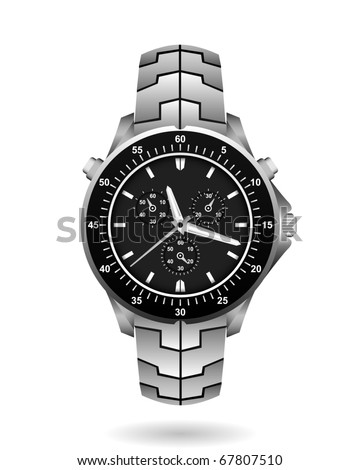
Below is an example of a vector watch I draw for IStockPhoto. For the details of pricing and number of downloads, please go to http://www.istockphoto.com/file_closeup.php?id=15216729


Friday, January 21, 2011

Fotolia Cuts Contributor's Commission

Like IStockPhoto, Fotolia will be cutting contributor's commission by about 20% next week. To be frank, I feel that contributor's are being bullied and no longer a precious to stock agencies. There are too many contributors. And when supply is more than demand, stock agency will take the opportunity to exploit the contributor's effort for their own benefits. This is wrong, but it is a reality.

According to Fotolia, the increment for their own royalty is a must to expand their marketing coverage to country like China. If what they speak is the truth, then I must say this is for everyone's good. I do not mind if Fotolia will take my 20% royalty to market more. Afterall, without marketing, a business will not work. It is OK to get a little less on the royalty if they are able to increase the volume of downloads.

But how true is the above statement? My 20% commissions may not be fully gone into development and marketing. 15% of my cut may go into the upper management's salary so that they can go for a vacation on a cruise to see Alaskan's melting ice. We are the minority. We work hard, but we don't get our share back, and we are not able to see the truth. There is no transparency in this.

The only solution for all these problem is to have a revolution. Is like how Google suddenly takeover the search industry, and how Apple iPhone change the communication devices. We love Google and Apple more and more each days, and that has never happen in microstock industry. I wish that one day, a revolution will come and takeover the whole industry to a new height where it will benefit everyone (contributors, the agency, and buyers). Adobe should create a microstock site. But they don't have Steve Job or Bill Gates.

Revolution must come. Now the only savior is Shutterstock. If it offers exclusivity, I will definitely join them. I believe 90% of the independent contributors will join Shutterstock if it offers exclusivity and increase the pricing. Shutterstock earning is about 30-100 times more than other agencies. With move like this, competitors such as Fotolia and Dreamstime will really go down.

Wednesday, January 19, 2011

How to write a DMCA

DMCA stands for Digital Millennium Copyright Act. In case you found someone took your vector and sell it at certain agency, you can write a DMCA to the agency to request for the removal of the infringed item. Recently, someone took my artwork, modified it, and sell it at a specific agency. I have contacted the Support about it, but they have requested me to write them a DMCA. Below is a sample on how to write a DMCA.

My copyrighted work: [state your URL item here] 
The infinging item: [state the URL of the item that used your work]  
This is a copyright for the following reasons:
1. [state your reason on why/how you think he steals your work]
2. [state your reason on why/how you think he steals your work]
3. [state your reason on why/how you think he steals your work]
My info:
Name: [your name]
Address: [your full address]
Tel: [your telephone number]
Email: [your email address]
I have a good faith belief that use of the copyrighted materials described above as allegelly infringing is not authorized by the copyright owner, its agent, or the law.
I swear, under penalty or perjury, that the information in the notification is accurate and that I am the copyright owner or am authorized to act on behalf of the owner of an exclusive right that is allegedly infringed.
[your signature here]

Once you have write the above, print it out, and then put your signature on it. After that, scan it into an image file (JPEG) and send it to agency by email.

I hope the above will help those in need of a DMCA sample.